
The Uintah County Court Calendar
Utah's state courts publish the Utah Courts public calendar. It is the official schedule search for Uintah County hearings. It covers current settings, not the full historical docket. You can query it by case number, party, judge, or attorney. Date plus location filters aim the search at the right calendar. The old PDF calendars are gone. The full calendars now may display cases, the attorneys on them, and charges.
Remember what a listing means. An entry shows a proceeding is scheduled, nothing more. It does not prove the hearing happened, that a ruling was entered, or that a charge ended in a conviction. Refreshes run on weekday mornings. A later continuance or order can still move the setting. When the result truly matters, pull the court file or check Utah Xchange.
Uintah Calendar Location Filters
The location filter matters most. Pick "Vernal District Court" for any District Court matter, since that court handles felony cases, Class A misdemeanors, domestic relations, probate, property, tort, and general civil cases. For county limited-jurisdiction matters, choose "Uintah County Justice Court," or select "Vernal Justice Court" when the papers name that location.
| Calendar label | Use | Check |
|---|---|---|
| Vernal District Court | District hearings | Case type and location |
| Uintah County Justice Court | County Justice settings | Citation or caption |
| Vernal Justice Court | Vernal matters | Official case location |
| Naples Justice Court | Retained search label | Confirm with county court |
Naples needs extra care. A current city page still shows a court and payment path. But official 2021 materials describe Naples dissolving its Justice Court. Uintah County took over cases from Naples boundaries. So the dropdown label alone does not prove a separate active court exists. Match the caption on your papers, then call the county Justice Court.
How to Find Your Court Date
Begin with the court named on your notice, citation, or filing. Different buildings house courts with different authority. A county-wide search can jumble them. Use the exact case number whenever you have it in hand. If not, search a party name and narrow the results by date and location.
- Open the official calendar and choose the known search type.
- Enter the case number, party, judge, or attorney information.
- Select a date and the specific Uintah County court location.
- Read the date, time, court, and access directions. Check again near the hearing.
- If no entry appears, call or visit the clerk, consult counsel, and inspect any courthouse posting.
The Vernal clerk handles District Court business at 920 E Highway 40, Vernal, UT 84078, reachable at 435-781-9300. Justice Court operations sit at 641 E 300 S, Suite 100, Vernal, UT 84078, with the number 435-781-5338. Hours and sessions can change, so verify before you travel.
Uintah Hearing Search Fields
The official calendar source shows why a narrow search beats browsing a broad day:
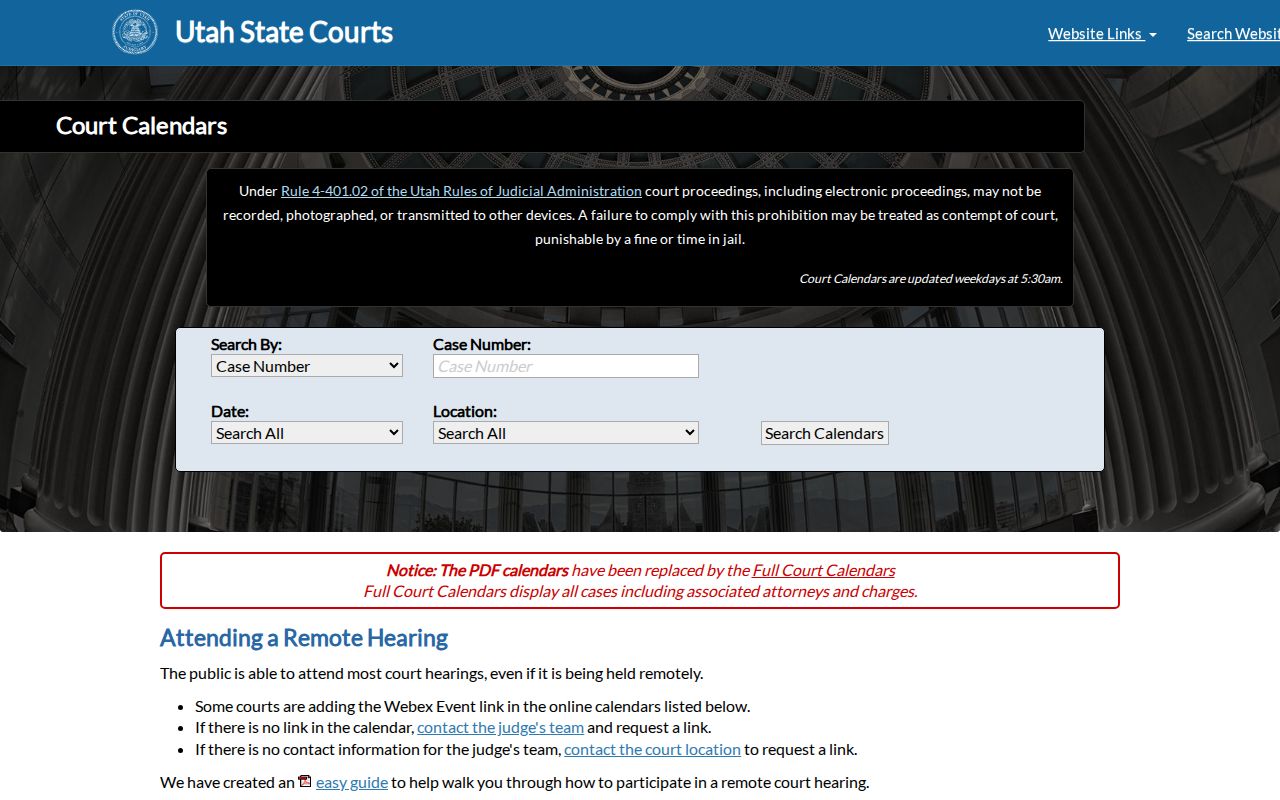
The screen allows a direct case-number search plus secondary routes by party, judge, or attorney. An attorney search has two routes. Enter a first and last name, or use a Bar Number. That helps when you know counsel. It covers times when a party's name spelling is unclear. It tells you nothing about how counsel's cases turned out.
Best match: Use the exact court location and a tight date range. A broad statewide list can create false matches.
Reading a Court Setting
Treat each setting as a set of linked fields. The case number anchors the entry. The location tells you which court plans to hear it. A judge or attorney can separate similar results. Assignments shift, though. Any charges shown remain allegations unless an official disposition says otherwise.
| Date | The scheduled day, subject to later change. |
|---|---|
| Time | The listed start or docket time. |
| Location | The District or Justice Court label. |
| Judge | The officer associated with the entry; assignment may change. |
| Setting Type | An arraignment, pretrial, motion hearing, trial, or other event. |
An arraignment is an early criminal proceeding, and a pretrial setting manages issues before a possible trial. A motion hearing takes up a request. None of these is a final outcome. Later Xchange history may reveal what actually occurred.
Uintah Remote Hearing Access
Remote hearings may be open to the public. That happens when a Webex link appears on the calendar or the judge's team grants access. Follow the directions attached to that setting. If no link appears, contact the court. Do not guess whether the hearing is in person or closed.
A 2022 Utah Courts notice documented remote-hearing kiosks at the Vernal courthouse. That is infrastructure history, not proof a kiosk serves every hearing now. Confirm current access. Note that the calendar notice bars recording, photographing, or transmitting proceedings without permission.
Remote access changes only how you attend. It does not shift deadlines or turn a calendar listing into a final record. Join with the case number and displayed event at hand. Use the name the court requests. Stay muted until called. A public viewer faces the same recording and transmission limits as a participant. If your connection fails, use the official court contact from the setting. Never use an unofficial meeting link. The listed time controls unless the court says otherwise.
Resets, Continuances, and Cancellations
A continuance moves a hearing to a later date. A reset assigns a different setting. A stricken event comes off the calendar. A cancellation ends that scheduled event. None of these words alone means the case was dismissed. Read the history for an order and the exact disposition.
- Continued
- The proceeding was postponed.
- Reset
- The court assigned or will assign a new setting.
- Stricken
- The event left the current calendar.
- Disposition
- An official outcome, distinct from a schedule change.
A changed event can disappear before the new one is easy to spot. Search the case number across a wider date range. Review Xchange, and check filed notices or MyCase if you are a party. When sources conflict, call the clerk or counsel. Note: A reset is not a dismissal. Removal from the calendar is not proof that no appearance is required.
No Uintah Calendar Result
An empty result can mean a few things. The docket search may be pointed at the wrong court. Or the name may carry a misspelling. A Uintah County hearing can also be missing because it was never entered, has moved, or falls outside the dates searched. Some matters are private or sealed and will never show. Naples cases sometimes sit under a county label.
- Check the number against the notice.
- Try the specific Vernal or Uintah location.
- Review Xchange for public case history.
- Contact the correct clerk.
- Ask counsel in a represented case.
Court staff will explain scheduling and process facts, though they cannot give legal advice. A blank docket search does not erase the case or your duty to appear.
Verify Uintah Hearings Before Travel
Uintah County hearings are not all held in one place. Vernal District Court sits at 920 E Highway 40. Justice Court operations run from 641 E 300 S, Suite 100. So read the location field on the calendar entry before you drive. Then confirm it through the official contact. Closures and judicial schedules can affect access too. Arrive about 30 minutes early, silence your phone, and follow staff directions. Security is governed by UCJA Rule 3-414, which bars listed weapons except where allowed. Don't count on parking, lockers, Wi-Fi, or transit unless the court confirms them. Bring the notice or citation showing your case number. That helps staff tell a District Court case from a county or city Justice Court matter. Jury service has a separate clerk contact, so don't use it for a case-setting question. If the entry lists remote access, confirm whether you must appear in person. If it names a room or building, trust that official field over a general county address. A few checks spare you the classic mistake: right time, wrong Uintah County court.
What To Do If You Miss a Setting
Act fast. Run the calendar and Xchange again. Then call the court named on the case. Give the case number and ask for public process information. If you have a lawyer, contact counsel first. Staff cannot erase an absence or tell you what argument to make.
Missed a setting? Failure to appear can lead to serious court action, including a warrant or bond consequence where the governing rule allows it.
Contact the correct Uintah County clerk or your attorney at once and confirm any new date through an official source.
Seek a licensed attorney for legal advice.
What happens next depends on the case, the event, and any order the judge signed. Never pay an unfamiliar caller or click a link to "clear" a warrant. Use the court's official number and record.