
Searching Cases by Name
Utah's statewide system for District and Justice Court case lookup is Utah Xchange. To search by name, type the last name (or company) in one field. Put the first name in another. Spell it exactly right first. The official help allows an asterisk wildcard. It helps with spelling variants or a middle initial. A company name goes in the last-name field, never the first.
- Choose District Court, Justice Court, or both. Both is a sound first search when the court is unknown.
- Enter the exact last name or company, then add the first name if known.
- Limit the scope to Uintah County or a known Vernal court location.
- Narrow a common name by case type and filing or disposition date.
- Compare location, type, number, and role before opening case history.
A name query that is too broad will stop at the official 500-result ceiling. Refine the search instead of trusting a partial list. Also note that a party code shows a procedural role only. The code PLA means plaintiff, and DEF means defendant. Neither code implies fault.
| Field | Type | Required | Use |
|---|---|---|---|
| Last name/company | Text | For party search | Exact name or asterisk variant |
| First name | Text | No | Narrows an individual |
| Jurisdiction | Choice | Yes | District, Justice, or both |
| County/location | Choice | No | Focuses the Uintah result |
| Date panel | Date range | No | Filters filing, disposition, or judgment dates |
Uintah Xchange Search Order
The official Xchange help explains the search controls for jurisdiction, case number, party name, case type, scope, birth date, citation, and dates. Its search screen shows the order most people follow in practice.
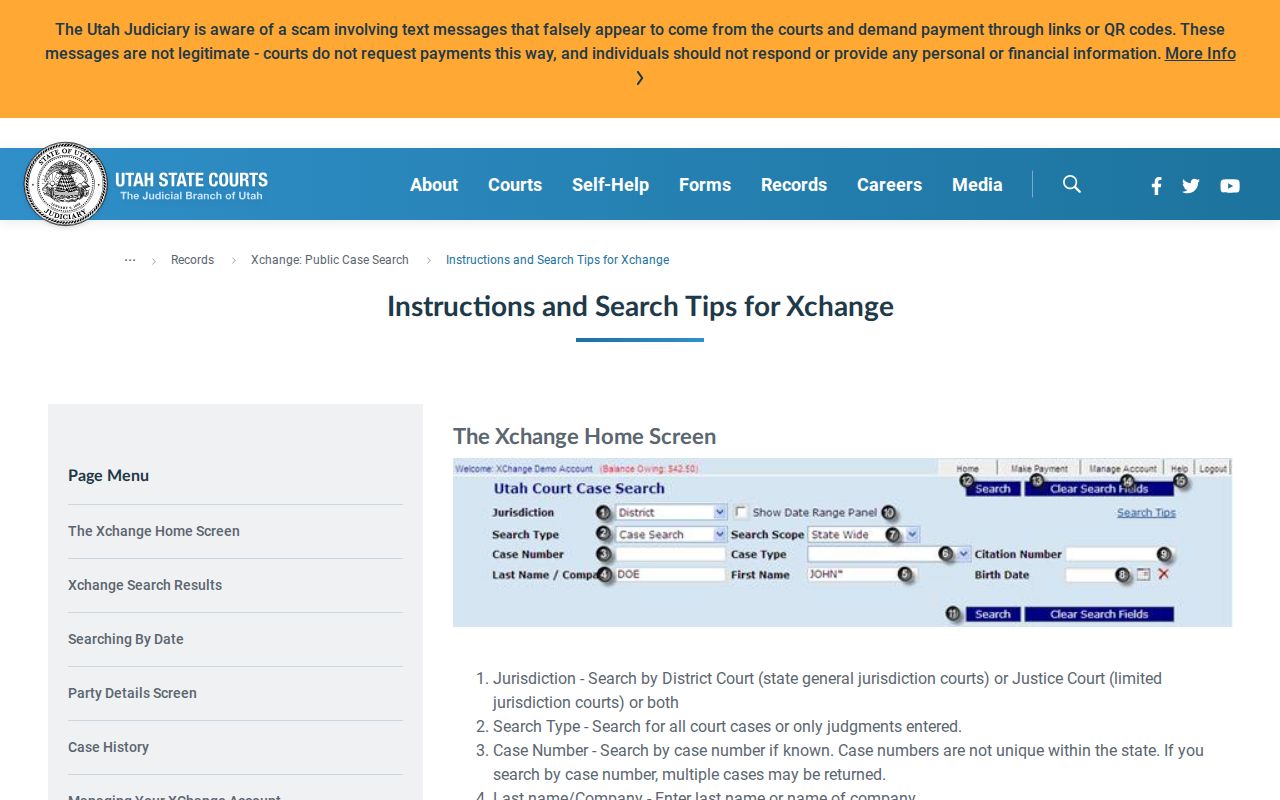
The screen offers several targeted routes rather than a single universal search box. Date filters carry different meanings. A filing date is when the case entered the system, while a disposition date marks an outcome entry. Judgment dates and satisfied-judgment dates apply to judgment records. A traffic violation date is not the filing date.
Pick "all court cases" for ordinary case research. "Judgments only" suits a judgment or lien search, but it cannot replace a search for the underlying case. Check the labels before drawing any conclusion.
Searching by Case Number
Case numbers are not unique across the state. The official help says the first two digits give the year. A neutral format example is YY########. Do not expand a copied or incomplete number from memory. Type the full number exactly as it appears on the court paper. Then add Uintah County or the known court location. The live record always controls.
Citations need court and county context too. A citation may lead to a Justice Court matter. But its identifier is not the same field as the later court case number. Pair it with the date and location when you can. A result may be public. That does not mean a private person's name should be republished.
If the number fails, strip punctuation only if the portal's format calls for it. Then try a party search. Check the calendar for an upcoming hearing, or call the court named on the paper. A failed number query does not prove that no record exists.
Uintah Case Codes in Results
Xchange classifies cases with short codes. Codes and display labels can change, so the official case-code table is the safe source. A few common examples help narrow a Uintah County case search.
- FS
- State felony in District Court.
- MO
- Other misdemeanor.
- DC
- Debt collection in the case-type table.
- SC
- Small claims, filed in Justice Court.
- TN / TC
- Traffic citation versus traffic court case.
Context matters with codes. The same letters appear on different lists. A judgment or disposition code, for example, may share letters with a case type while meaning something else. Open the full official description attached to the record, and never translate a bare code from memory.
What a Case Search Returns
A result row can list many fields. It covers county, court location, case type, case number, filing date, a party name, a party code, and a link to expanded history. Birth date may show up in authorized public fields. Keep it minimal and do not republish it in examples. The case-number link opens the history. Document images take a separate step and may cost money.
| Case Number | The court identifier; pair it with the location. |
|---|---|
| Court Location | The specific District or Justice Court site, more exact than county alone. |
| Case Type | The official category or code. |
| Filing Date | The entry date, not always the event or violation date. |
| Parties and Roles | Names and procedural roles, not findings of fault. |
| Proceedings | Chronological docket events, not every internal clerk action. |
| Documents | Public electronic images when classified and available. |
Expanded history may include charges, pleas, disposition fields, judge, attorneys, due dates, account data, and proceedings. Match every outcome to the same case and charge. A balance is not a disposition. A filed charge is not a conviction.
When Uintah Cases Do Not Appear
Local staff enter data into the Court Information System, known as CORIS. Public information reaches Xchange only after entry. So a recent filing, citation, hearing, or disposition can be missing for a short time. Older Justice Court coverage may also be thin. Courts converted their records on their own schedules. The official coverage material reports Vernal connected statewide on October 28, 1996. Earlier records may be sparse.
- Check spelling and an allowed wildcard.
- Search both District and Justice Courts.
- Add Uintah County and a specific location.
- Adjust the date and case-type filters.
- Ask the clerk about public inspection or terminal access.
CORIS public-record information notes that free public terminals sit at most District Court locations and may exist at Justice Courts. Call ahead before you travel. A no-result message means only that the chosen public query found no match at that moment.
Statewide vs County Case Search
Uintah County runs no separate public case database deeper than Xchange. Xchange is the statewide layer. It holds public District and Justice Court information that local courts enter. County and specific-court choices are just filters within that one system. For public inspection, questions about a field, or a written record request, the clerk remains the direct local route. The courthouse serves the same purpose.
| Route | Coverage | Best use |
|---|---|---|
| Xchange | Statewide District and Justice cases | Public name, number, citation, and history searches |
| Uintah court clerk | The court’s own file and process | Confirming an entry or requesting a public record |
| CORIS terminal | Public court information at participating sites | Courthouse access without remote Xchange charges |
| MyCase | An authorized party’s linked cases | Own papers, notices, payments, and history |
MyCase is free party-facing access, not a public name-search tool; it relies on identity and case-linking steps. E-filing serves filers, not the public. Federal cases live in PACER, not Utah Xchange.
Uintah Xchange Access Costs
Paid remote access runs through Xchange. The official Xchange fee page posts the current schedule, so check the figures there before you buy. The schedule lists a $10 initial credit for one-time or guest use. After that, you pay $0.35 per search and $1 per document. Monthly access brings a $25 setup fee. A $40 monthly charge then covers 500 searches.
| Access item | Researched amount | Caution |
|---|---|---|
| Guest initial credit | $10 | Guest leftover credit may be forfeited |
| Search | $0.35 | Narrow before submitting |
| Public document | $1 | Only if public and electronically available |
| Monthly account | $25 setup + $40/month | Includes 500 searches |
Registering an account asks for billing information. Enter it only in the official portal, never through a general contact form. If paid remote access does not fit your situation, a free courthouse terminal or a public inspection request may serve you better.
Access and Restricted Cases
Under UCJA Rule 4-202.02, court records fall into four classes: public, private, protected, and sealed. Xchange hides sealed or expunged matters. Adoption, civil commitment, juvenile delinquency, child-welfare, and termination cases are hidden too. Still, some public domestic-relations history can appear. Hearings, judgments, orders, or decrees may show up even where the underlying content stays private.
UCJA Rule 4-202.03 gives any person the right to see a public court record. Anything beyond that needs authorization under the rules or a court order. A written request under Rule 4-202.04 does not convert restricted records into public ones.
Public does not mean complete. Use public Xchange, calendar, clerk-inspection, and request routes. Do not seek protected identifiers or assume a missing restricted case never existed.
Correcting a Uintah Search Error
Spot an error in public Xchange information? Contact the court that entered the record. Keep the case number, county, court location, and the exact field at issue saved together. That way the clerk can find the right Uintah County record. Never send full identity documents or sensitive records through an unsecured site. The clerk can explain how to raise a correction concern but cannot give legal advice.
For District Court matters, use the Vernal District Court. It sits at 920 E Highway 40, Vernal, UT 84078, 435-781-9300. The Justice Court sits at 641 E 300 S, Suite 100, Vernal, UT 84078, 435-781-5338. Call or visit whichever court appears in your result. A broad clerk search is not guaranteed, and protected records still follow the access rules.
Frame the problem in neutral terms. Say that the public display shows a certain filing date, location, party role, or disposition. Point to the official paper that seems to differ. Do not ask a third party to alter a court record. Only the responsible court can fix its own data. A mismatch may simply mean the result reflects a later entry that was not on an older copy.